Migrating from Jekyll Minimal Mistakes theme to Chirpy
Migration from Jekyll Minimal Mistakes theme to Chirpy with custom layouts, plugins, and CSS/JS tweaks

This site was originally built with the Minimal Mistakes Jekyll theme, still available here. After several years, I have migrated to Chirpy, a more modern and feature-rich theme.
Why Chirpy
- Modern UI with dark/light mode toggle, responsive sidebar navigation, and clean typography
- Built-in TOC (table of contents) with smooth scrolling and active heading tracking
- Native Mermaid support: was able to drop
jekyll-spaceshipdependency
Customizations
Jekyll allows overriding theme defaults by placing files in the same paths as the theme gem. These are the customizations I applied on top of Chirpy.
Custom home page
The default Chirpy home page shows a paginated list of posts. I replaced it with a custom layout (_layouts/home.html) that adds:
- A year summary table at the top with post counts per year
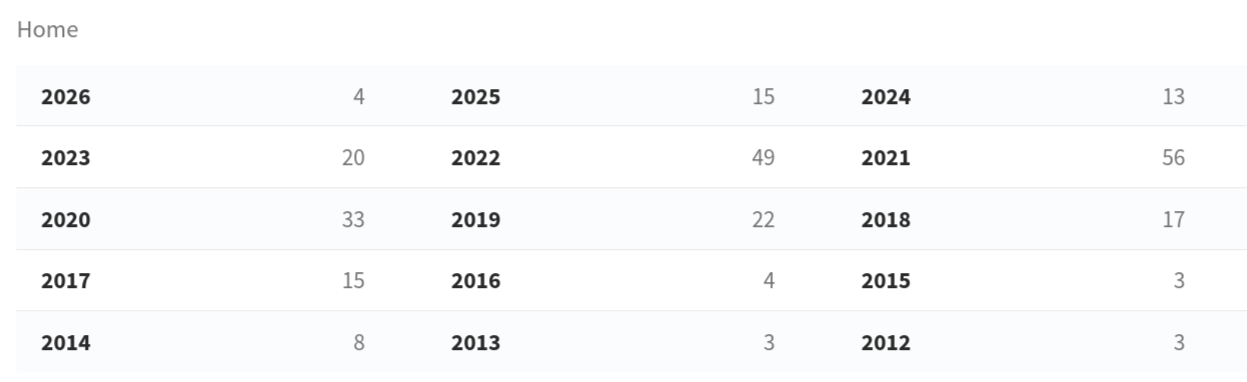
- Year headers that separate posts chronologically and are linked from the summary table

remote_include plugin
The site imports README files from GitHub repositories using a custom Liquid tag. The original jekyll-remote-include gem is archived and does not support relative paths.
The drop-in replacement (_plugins/remote_include_rewrite.rb):
- Fetches raw markdown from GitHub
- Strips the first
# Titleheading from the imported content to avoid duplication with the post’s frontmatter title - Rewrites relative image paths to raw.githubusercontent.com URLs so images render correctly
- Rewrites relative links to GitHub blob URLs so they point to the source repository
- Escapes false reference link definitions (e.g.,
[Feature request]: text) that Kramdown would otherwise swallow - Strips raw tags from search index — a post-render hook removes leftover
Liquid tags frompost.contentso the search index shows clean text instead of raw template syntax
octocat_emoji plugin
The _plugins/octocat_emoji.rb plugin adds:

- Frontmatter
image_linksupport — replaces the default preview image lightbox with a custom URL - Removes the
popupclass from shields.io and visitor-badge links to prevent centering/lightbox behavior
CSS and JS tweaks
All visual tweaks live in _includes/metadata-hook.html:
- Prevent preview image stretching — keep banner images at their original aspect ratio
- Disable avatar zoom on hover — removes the CSS scale transform
- Expand TOC by default — overrides
.is-collapsedwithmax-height: 1000px !important - Extend TOC to h5/h6 — re-initializes tocbot with
headingSelector: 'h2, h3, h4, h5, h6'after a 500ms delay (Chirpy only supports h2–h4 by default) - Bold h5/h6 headings in post content
- Style h5/h6 entries in TOC — smaller font size for h5/h6 in the desktop TOC, and proper indentation for h5/h6 in the mobile TOC popup
- Keyboard shortcut
/to open search,Escapeto close it — pressing/anywhere on the site opens the search box (skipped when focus is in an input or textarea); pressingEscapecloses it - Hide line numbers on shell code blocks — hides the gutter on
sh/bashtagged code blocks and adjusts padding to align with plaintext output blocks - Merge output blocks into preceding code blocks — removes the gap between consecutive code blocks and hides the header on plaintext (output) blocks, while preserving headers on command blocks
1
  echo output block # example
1
  output block
- Hide “Plaintext” label on untagged code blocks
- Hide
{content}placeholder in search results — for image-only posts with no text content, SimpleJekyllSearch leaves the literal{content}template variable visible; the fix monkey-patches the search initialization to return an empty string when content is empty
TOC on page layouts
Chirpy only renders the TOC panel on post layouts. Added TOC support for page layouts (e.g., the talks page) via:
_layouts/page.html— adds TOC panel and mobile popup markup for pages withtoc: true_includes/js-selector.html— loads tocbot JS on pages (not just posts)
Custom locale
Chirpy’s default sidebar only includes Home, Categories, Tags, Archives, and About tabs. Added a custom locale override (_data/locales/en.yml) that adds “Series” and “Talks” tab labels for the sidebar navigation.
Atom feed fix
Chirpy’s default feed template uses site.baseurl for icon/logo paths, producing relative URLs that RSS readers (e.g., Feedly) cannot resolve. The override (assets/feed.xml) uses the absolute_url filter instead.
shields.io badges
Replaced all GitHub button iframes (watch, star, fork, follow) with shields.io badges using ?style=social. The badges are SVG-based and dynamically size to fit the count digits, unlike the fixed-width iframes.